No products in the cart.
RFID Depo Editorial Team · August 2026 · 10 min read
The scene: An employee hands in their notice. They have three laptops, a mobile phone and various equipment assigned to them. The assignment record is in a spreadsheet. But which file? Who last updated it? Were the devices ever collected? Nobody knows — and this scenario plays out in most organisations every single month.
Asset tracking is the process of recording which company-owned items are assigned to which employees, and making it possible to account for them when needed. In a small organisation, a spreadsheet handles this well enough. But as headcount grows, device variety increases and sites multiply, the spreadsheet starts to fail.
This guide explains what an asset tracking system is, why spreadsheets fall short, and how to build a proper solution — from basic software to full RFID integration.
📋 Table of Contents
1. What Is Asset Tracking? The Legal Side
Asset tracking is the formal process of recording company-owned movable property — computers, phones, vehicles, equipment, tools — assigning them to individual employees and documenting that assignment in writing. The assignment record serves as a legal accountability document signed by both employer and employee.
The legal dimension: Under employment law, assets formally assigned to an employee must be returned in full when they leave. Without a signed assignment record, pursuing a claim for unreturned or damaged items becomes very difficult in practice. A proper assignment record is also used in financial audits to confirm physical possession of assets recorded on the balance sheet.
Asset tracking is not just "who has what" — it is the company's legal protection and an integral part of its financial records.
2. 6 Core Problems with Spreadsheet Asset Tracking
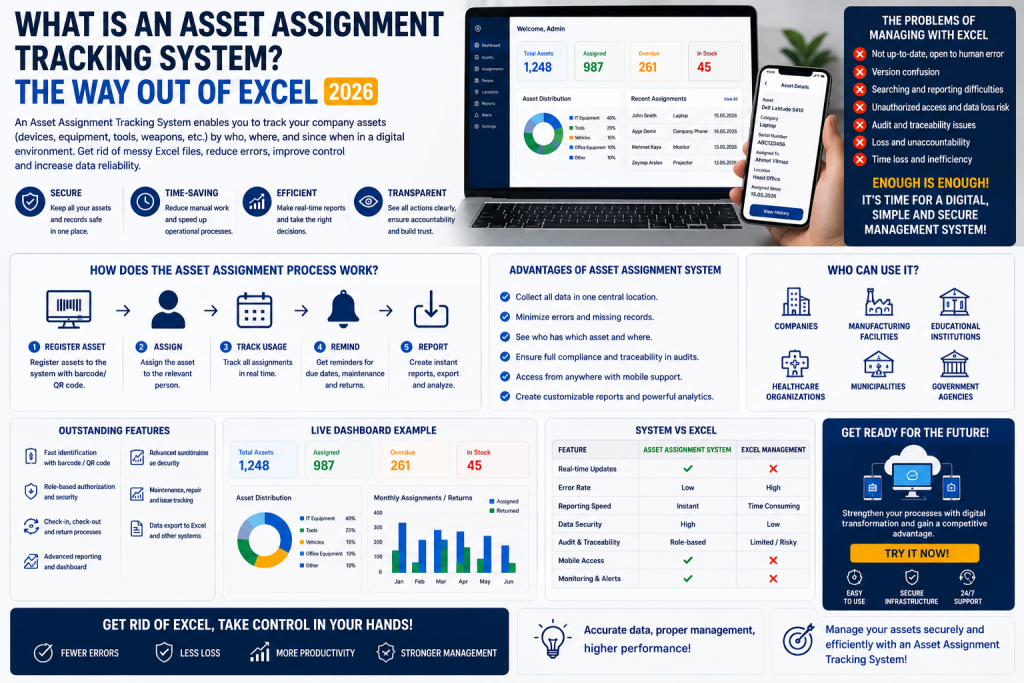
Spreadsheets work for asset tracking up to a point — then they become the problem. Here is why:
1
Only One Person Can Edit at a TimeWhile HR has the file open, IT cannot update it. The site manager keeps their own copy. Over time, multiple "current" versions circulate and nobody knows which one is accurate.
2
No Signature or Approval TrailWriting "assigned" in a cell carries no legal weight. Without a signed acknowledgement — digital or wet ink — the assignment cannot be proven. Spreadsheets have no mechanism for capturing consent or approval.
3
Leavers Create a CrisisAn employee resigns. Which spreadsheet holds their assigned items? When was it last updated? Was their previous laptop collected? These questions go unanswered, creating both legal exposure and the real risk of equipment walking out the door.
4
No History or Audit TrailA laptop passed through four employees over three years. Tracking that history in a spreadsheet is nearly impossible. Who took it, when they returned it, what condition it was in — that information gets overwritten and lost.
5
Physical Counts Are PainfulAnnual asset counts mean manually reading every serial number into a spreadsheet — hours of work with a high error rate. By the time the count finishes, new discrepancies have already appeared.
6
Reporting and Audits Are Slow"How many laptops do we have, how many are assigned, how many are in storage?" — answering this in real time from a spreadsheet is very difficult. In a financial audit or internal review, that information may be needed within minutes.
3. What Is an Asset Tracking System?
An asset tracking system is a digital platform where all company-owned assets are registered, assigned to employees, managed through the full issue-and-return lifecycle, and reported on in real time.
✅ Asset Register
Every device is logged with serial number, brand, model, purchase date and value.
✅ Assignment
Assets are issued to employees in a few clicks. Digital acknowledgement gives legal validity.
✅ Returns
When someone leaves, a full list of their assigned items is generated automatically. Items are ticked off as they come back.
✅ Full History
Every assignment and return is permanently recorded — who had it, when, in what condition. Cannot be overwritten.
✅ Live Reporting
"How many laptops are unassigned?" — answered in seconds, not hours.
✅ Multi-User Access
HR, finance, IT and site managers all work from the same live data with role-based permissions.
4. What a Good Asset Tracking System Must Include
| Feature | Why It Matters |
|---|---|
| Digital signature / e-acknowledgement | Required for the assignment record to carry legal weight |
| Full assignment history | Every transfer and return must be permanently retained |
| Leaver checklist / offboarding wizard | Full list of assigned items generated automatically on departure |
| Barcode / RFID integration | Critical for fast, accurate physical counts |
| ERP / finance integration | Synchronises with accounting and depreciation records |
| Mobile app | Field staff and site managers need access on the move |
| Alerts and notifications | Warranty expiry, maintenance due and return reminders |
| Multi-site support | Manage different offices and sites independently in one platform |
5. RFID Asset Tracking: What's the Difference?
A software-based asset tracking system handles the administration — registering assets, issuing them, recording returns, reporting. But physical counts are still a bottleneck: reading hundreds of serial numbers one by one takes hours.
This is where RFID changes the picture entirely.
📊 Barcode Asset Tracking
A barcode label is applied to each asset. During a count, each label is scanned individually with a barcode reader and logged in the system.
✅ Low cost and widely available
✅ Sufficient for simpler operations
⚠️ One at a time — slow for large estates
⚠️ Label must be visible to be scanned
📡 RFID Asset Tracking
An RFID tag is applied to each asset. A handheld reader or fixed reader scans an entire room in seconds — labels do not need to be visible.
✅ Hundreds of assets read per second
✅ Reads through cupboard doors and boxes
✅ Detects assets in the wrong location
✅ Matches against assignment records instantly
| Criterion | Spreadsheet | Software + Barcode | Software + RFID |
|---|---|---|---|
| Setup effort | ✅ Minimal | Medium | Medium |
| Multi-user access | ❌ Difficult | ✅ Yes | ✅ Yes |
| Digital acknowledgement | ❌ No | ✅ Yes | ✅ Yes |
| Count time (300 assets) | 4–6 hours | 2–3 hours | 15–30 minutes |
| Reads through cupboards | ❌ | ❌ Must be visible | ✅ Yes |
| Find a missing asset | ❌ | ❌ | ✅ Audio-guided search |
| Cost | Zero | Low–Medium | Medium–High |
💡 From how many assets does RFID make sense? Below 300 assets, barcode software is typically sufficient. Above 300–500 — particularly in multi-floor buildings, complex layouts or multi-site organisations — RFID investment pays back within 12–18 months. Add up the annual cost of manual counts and the value of equipment that goes missing: it usually exceeds the RFID investment by a wide margin.
6. How to Set Up an Asset Tracking System
Setting up an asset tracking system from scratch is more straightforward than it sounds. Follow these steps:
1
Pull your existing asset list together
Use your existing spreadsheet if one exists. If not, pull data from IT, finance and a physical walkthrough to build a starting inventory. For each asset record: brand, model, serial number, purchase date, value, location.
Use your existing spreadsheet if one exists. If not, pull data from IT, finance and a physical walkthrough to build a starting inventory. For each asset record: brand, model, serial number, purchase date, value, location.
2
Label every asset
Apply a barcode or RFID label to each item depending on your chosen technology. The label code links the physical asset to its system record. Use on-metal labels for metal-cased equipment such as laptops and servers.
Apply a barcode or RFID label to each item depending on your chosen technology. The label code links the physical asset to its system record. Use on-metal labels for metal-cased equipment such as laptops and servers.
3
Import and assign
Upload the asset list to your chosen system — most support Excel or CSV import. Assign each asset to the relevant employee. The employee confirms digitally, and an assignment record is generated automatically.
Upload the asset list to your chosen system — most support Excel or CSV import. Assign each asset to the relevant employee. The employee confirms digitally, and an assignment record is generated automatically.
4
Configure user permissions
HR sees all employees' assigned items. Finance sees asset values and depreciation. Site managers see only their site. IT sees device detail and maintenance history. Each role sees what it needs — nothing more.
HR sees all employees' assigned items. Finance sees asset values and depreciation. Site managers see only their site. IT sees device detail and maintenance history. Each role sees what it needs — nothing more.
✓
Make cycle counting a routine
Replace the annual full count with monthly cycle counts — a different area each month so everything is covered across the year. With RFID, a floor of 300 assets takes 15–30 minutes. The system automatically flags any assignment mismatches.
Replace the annual full count with monthly cycle counts — a different area each month so everything is covered across the year. With RFID, a floor of 300 assets takes 15–30 minutes. The system automatically flags any assignment mismatches.
How many assets do you have? Which solution fits your operation?
Share your asset count, site structure and current tracking method — we will help you identify the right solution and build a plan around your needs.
Get Free Consultation → RFID Asset Tracking System7. Frequently Asked Questions
Is a signed asset assignment record legally required?
Not mandated by statute in most jurisdictions, but strongly recommended. Without a signed record, pursuing a claim for unreturned or damaged equipment is very difficult in practice. An employment tribunal or civil court will expect to see documented evidence of the assignment. Digital signatures are legally equivalent to wet ink in most countries.
Can an asset tracking system integrate with our ERP or finance system?
Yes. Most asset tracking platforms integrate with SAP, Oracle, Microsoft Dynamics and other major ERP systems. The fixed asset register in your finance system and the assignment records in your tracking system stay in sync automatically. Depreciation schedules update without manual intervention.
How do I migrate our existing spreadsheet into the system?
Most asset tracking systems support Excel or CSV import. You map your column headings to the system's fields and the bulk upload takes minutes. Data cleansing beforehand — removing duplicates, standardising formats — makes the process smoother.
From how many employees does a dedicated system become worthwhile?
Below 50 employees, a well-maintained spreadsheet is manageable. From 50–100 employees, barcode-based software is recommended. Above 100 employees, or in multi-site organisations, RFID-integrated tracking delivers a clear return on both time and equipment costs.
Can RFID tags be applied to all types of assets?
Standard RFID labels work on plastic, wood and glass surfaces. For metal-cased assets — laptops, servers, equipment housings — on-metal RFID tags are required. For very small items, micro RFID tags are available. We can advise on the right tag type for each category in your estate.
Cloud-based or on-premise — which is better?
Both work well. Cloud-based systems require no infrastructure, are accessible from anywhere and are maintained by the vendor — ideal for multi-site organisations. On-premise suits organisations with strict data sovereignty requirements, such as public sector, healthcare and financial services.
Conclusion
Spreadsheet asset tracking works — but only at small scale and for a limited time. As headcount grows, turnover increases and the asset estate expands, a spreadsheet stops being a solution and starts being a liability.
A dedicated asset tracking system beats the spreadsheet on every dimension that matters: legal protection, time savings and loss prevention. RFID integration takes physical counting from hours to minutes and brings the whole estate under real-time control.
The right time to make the transition is before the next leaver triggers a crisis — not after.
Related content: How Long Should a Fixed Asset Count Take? · Why Does Warehouse Stock Discrepancy Occur? · RFID Asset Tracking System · RFID Handheld Terminals · Barcode vs RFID