No products in the cart.

RFID Depo Editorial Team · July 2026 · 12 min read
What you will learn: What a fixed asset tracking system is, why you should choose RFID over barcodes, and how to set the system up step by step. Whether you manage a factory, office, hospital, hotel or school — whether you have 50 assets or 50,000 — this guide is written for you.
Does your physical asset count never match your records? Does finding out which device is assigned to whom take hours? Does your annual asset audit tie up your entire team for days on end?
These are problems shared by the vast majority of organisations worldwide. The solution is simpler and more accessible than you might think: an RFID-based fixed asset tracking system. This guide walks you through the entire setup process from start to finish.
📋 Table of Contents
- What Is a Fixed Asset and Why Does It Need Tracking?
- Barcode vs RFID: Which Is the Right Choice?
- Components of an RFID Asset Tracking System
- Step-by-Step Setup Guide
- Choosing the Right RFID Tag for Each Asset Type
- Cost and Return on Investment
- Use Cases by Sector
- 5 Common Setup Mistakes
- Frequently Asked Questions
1. What Is a Fixed Asset and Why Does It Need Tracking?
A fixed asset is any long-term physical item that an organisation uses to carry out its operations and that is not held for sale. Computers, printers, medical devices, production machinery, office furniture, projectors, vehicles and hand tools all fall within this category.
From a regulatory perspective, organisations are required to maintain accurate records of their fixed assets, calculate depreciation and carry out periodic audits. Beyond compliance, asset tracking is a critical operational necessity.
30%
Average asset loss rate in organisations using barcode systems
3–5 days
Average time for a manual asset audit in large organisations
4 hours
Time needed for the same audit with RFID
Untracked assets lead to a cascade of problems: loss and theft, unnecessary repeat purchases, incorrect depreciation calculations, audit risk and insurance complications. Every one of these translates directly into financial loss.
2. Barcode vs RFID — Which Is the Right Choice?
Most organisations still rely on barcode-based asset tracking. Barcodes have served well for decades, but they come with significant limitations that RFID eliminates entirely.
| Criterion | Barcode | RFID |
|---|---|---|
| Reading method | One by one, line of sight required | Bulk read, no line of sight needed |
| 100 assets audit time | 30–60 minutes | 2–5 minutes |
| If label is damaged | Unreadable — system breaks down | Still readable (chip is protected) |
| Reading through closed cabinet | ❌ Must be opened | ✅ Read while closed |
| Multiple checkpoints | Staff required at every point | Fixed reader — 24/7 automatic |
| Write data to tag | ❌ Not possible | ✅ Updateable |
| Upfront cost | Low | Medium (amortised quickly) |
💡 When to choose RFID, when to choose barcode? If you have fewer than 500 assets and audit once or twice a year, a barcode system may suffice. If you have 500+ assets, need monthly or continuous auditing, operate across multiple locations, or have a high proportion of metal-surface assets, RFID is the right choice.
3. Components of an RFID Asset Tracking System
An RFID fixed asset tracking system consists of four core components. Selecting each one correctly directly determines the system's success.
🏷 Component 1: RFID Tags (Asset Labels)
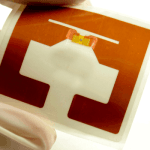
A small electronic label adhered or screwed onto each asset. The embedded chip stores the asset's unique identity (its EPC number). Different tag formats are used depending on the asset surface: standard adhesive, hard on-metal tags or plastic-bodied tags.
Frequency: UHF 860–960 MHz (most asset tracking applications) · Lifespan: 5–10 years
📱 Component 2: RFID Handheld Terminal (Mobile Reader)
A mobile device carried by staff as they walk room to room, shelf to shelf, reading assets in bulk. It can read 200–400 tags per second simultaneously. Runs on Android and connects to the central system via Wi-Fi or 4G.
Read range: 1–6 m · Battery life: 8–12 hours · Example models: Chainway C72, Zebra MC3300x
📡 Component 3: Fixed RFID Reader + Antenna (Optional — for Continuous Tracking)
A fixed system mounted at a doorway or zone entrance that automatically logs every asset that passes through — 24/7, without any staff involvement. It answers "which room did this asset move to?" in real time. Ideal for high-value equipment, hospitals or factories where assets move frequently.
Note: Not mandatory — a handheld terminal alone may be sufficient · Example models: Zebra FX7500, Chainway R2000
💻 Component 4: Software and ERP Integration
The software layer that matches EPC data to asset records, manages custodianship, generates reports and integrates with your ERP system (SAP, Oracle, Microsoft Dynamics, etc.). Some organisations use dedicated asset management software while others add an RFID module to their existing ERP.
Integration options: SAP · Oracle · Microsoft Dynamics · Custom ERP
4. Step-by-Step Setup Guide
Setting up an RFID fixed asset tracking system involves six steps. Complete each step correctly and the system will go live without issues.
1
Extract and Categorise Your Asset Register
Before going live, you need a complete and accurate asset list. This list should include: asset name, brand/model, serial number, purchase date, value, location and assigned custodian.
Action items:
- Export your current asset list from Excel or your ERP
- Carry out a physical count to verify the list (this will be your last manual audit)
- Classify assets by type: electronics, furniture, vehicles, machinery, etc.
- Note the surface material for each type — metal, plastic or wood — as this determines the tag
2
Select the Right RFID Tag for Each Asset Type
This is the most critical step. The wrong tag choice leads to either complete non-reading or rapid tag failure. The correct tag type varies by asset surface.
| Asset Type | Recommended Tag | Why? |
|---|---|---|
| Plastic / Wood surface | Standard adhesive UHF label | Most cost-effective, wide read range |
| Metal surface (PC, machine, rack) | Hard on-metal RFID tag | Metal disrupts signal — specialist tag required |
| Small electronics (laptop, tablet) | Micro UHF label or mini metal tag | Fits small surface, low-profile |
| Outdoor / harsh-environment equipment | IP67 hard tag | Resistant to water, dust, moisture and UV |
| High-value, theft-prone assets | Screw-mount hard tag | Cannot be removed, tamper-evident |
3
Encode Tags and Apply Them to Assets
Each tag is encoded with a unique EPC (Electronic Product Code) number, which is then linked to the corresponding asset record. An RFID printer writes the EPC to the tag and prints human-readable information — such as the asset number and name — on its surface.
Practical tip: Carry out tagging centrally in one location as a batch operation. Tagging 1,000 assets typically requires 2–3 days of staff effort. For large organisations, tagging services can be sourced directly from your RFID supplier.
4
Install Software and Import Asset Data
Install the asset management software or add an RFID module to your existing ERP. Import your current asset register (from Excel or your ERP) into the system. Match each asset record to its corresponding EPC number. Location, custodian and depreciation data are also entered at this stage.
⚠ Important: Before selecting software, always confirm whether it integrates with your existing ERP. Ready-built integration modules exist for SAP, Oracle, Microsoft Dynamics and many custom ERP platforms. Verify compatibility upfront.
5
Carry Out the First Audit with the Handheld Terminal
Once the handheld terminal has been registered in the system, the first audit is conducted. Staff walk through the room or area holding the terminal — all assets are read within seconds. The system compares what was found against the register and flags any missing or mislocated assets.
Why the first audit matters: It tests the system's accuracy and identifies any tags that were not read. A 2–5% first-read miss rate is normal and is almost always caused by incorrect tag placement or a metal surface issue — both easily corrected.
6
Set a Periodic Audit Schedule and Train Staff
Once the system is live, establish an audit schedule. With RFID, monthly or even weekly audits are no longer an operational burden. The handheld terminal takes around 30 minutes to learn. Train staff on the essentials: switching the terminal on, starting an audit and viewing the report.
✅ The outcome: With the system fully live, your annual asset audit drops from 3–5 days to half a day. Loss rates typically fall by 70% in the first year.
5. Choosing the Right RFID Tag for Each Asset Type
Tag selection is the most technical aspect of the setup. The wrong tag means either no reads, a very short lifespan or the tag falling off the asset. We have summarised the best formats by environment and asset type.
📋 Standard UHF Label
Paper or PET adhesive, cost-effective
Suitable for: Furniture, wooden shelving, plastic equipment, cardboard boxes
🔩 Hard On-Metal Tag
Specially designed to work on metal surfaces
Suitable for: PC chassis, machinery, racking, cabinets, vehicles
🔬 Micro / Mini Tag
Very small form factor, low-profile
Suitable for: Laptops, tablets, small electronics
🌧 IP67 Outdoor Tag
Hard-cased, resistant to water, dust and UV
Suitable for: Construction equipment, outdoor facilities, vehicles
🔐 Tamper-Evident Tag
Self-destructs if removed — security guaranteed
Suitable for: High-value electronics, medical devices, IT equipment
🧪 Glass / Vial Tag
Special format for glass tubes and bottles
Suitable for: Laboratory equipment, medical supplies, chemicals
6. Cost and Return on Investment
An RFID asset tracking investment is assessed across three main cost lines. With correct sizing, most mid-sized organisations recover the investment within 12–18 months.
| Cost Item | Description | Key Variable |
|---|---|---|
| RFID Tags | One tag per asset | Tag type and quantity |
| RFID Handheld Terminal | 1–3 units depending on site size | Model and quantity |
| Software / Integration | Ready-made software or ERP module | Depends on existing ERP |
| Fixed Reader (Optional) | For doorway / zone tracking | Number of checkpoints |
| Typical payback period | 12–24 months (depending on asset count and loss rate) | |
Free cost analysis: Share your asset count, asset types and current ERP system — the RFID Depo technical team will prepare a tailored system recommendation and cost estimate at no charge.
7. Use Cases by Sector
🏭 Manufacturing Facility
Machinery, equipment and hand tools are easily lost in environments shared by hundreds of workers. RFID lets you see in real time which production line every piece of equipment is on and who it is assigned to. Equipment handover between shifts is digitalised instantly.
🏥 Hospital and Healthcare
Portable medical devices — ventilators, ECG machines, defibrillators — create life-threatening risk when they cannot be found in an emergency. RFID shows which floor and room every device is in within seconds. Sterilisation tracking and maintenance reminders can also be integrated.
🏢 Office and Corporate Headquarters
Laptops, monitors, projectors and furniture. When staff change roles, asset handover is completed in seconds. Annual IT asset declarations and audit reports are generated automatically.
🏨 Hotel and Hospitality
TVs, minibars, hairdryers and other in-room equipment are at constant risk of going missing. RFID checks instantly at checkout whether the room's inventory is complete. Missing equipment costs can be automatically added to the guest bill.
🎓 University and Public Sector
Universities and government bodies with thousands of assets spread across different buildings face enormous annual audit workloads. RFID reduces audit time from days to hours and generates statutory reporting automatically.
8. Five Common Setup Mistakes
1
Applying a standard label to a metal asset
Metal absorbs or reflects UHF radio signals. A standard adhesive label on a metal surface simply will not be read. Always use on-metal tags for metal assets.
Metal absorbs or reflects UHF radio signals. A standard adhesive label on a metal surface simply will not be read. Always use on-metal tags for metal assets.
2
Leaving software integration until the end
ERP integration planning should begin before tagging and hardware installation are finished. Integration can take time; having hardware ready but software waiting leaves the system non-functional.
ERP integration planning should begin before tagging and hardware installation are finished. Integration can take time; having hardware ready but software waiting leaves the system non-functional.
3
Starting with an inaccurate asset register
If the data entered into the system is incomplete or incorrect, the results will be wrong regardless of how well the RFID hardware performs. Carry out a clean-up count before going live.
If the data entered into the system is incomplete or incorrect, the results will be wrong regardless of how well the RFID hardware performs. Carry out a clean-up count before going live.
4
Going live without training staff
Even though the handheld terminal is straightforward, deploying the system without a short training session for staff will inevitably produce incorrect counts and flawed reports. Two to three hours of training is all that is needed.
Even though the handheld terminal is straightforward, deploying the system without a short training session for staff will inevitably produce incorrect counts and flawed reports. Two to three hours of training is all that is needed.
5
Rolling out across the entire site without a pilot
For larger organisations, start with a single department or floor as a pilot rather than the whole site at once. Resolve issues at small scale first, then expand. This reduces risk and accelerates the learning curve.
For larger organisations, start with a single department or floor as a pilot rather than the whole site at once. Resolve issues at small scale first, then expand. This reduces risk and accelerates the learning curve.
Ready to set up your RFID asset tracking system?
Share your asset count, asset types and current ERP — we will prepare a tailored system design and free cost analysis.
Get Free Consultation → Asset RFID Tags9. Frequently Asked Questions
How many assets do I need before RFID is worthwhile?
The general rule is this: if you have more than 300 assets, an RFID system will pay for itself within 12–18 months. Fewer than 300 and a barcode system may be more economical. However, if your assets are predominantly metal-surfaced, high-value or frequently moved, RFID makes sense even at 100 assets.
Will it integrate with my existing ERP or asset management software?
Yes. Integration is possible with any ERP or asset management platform that supports API connectivity — including SAP, Oracle, Microsoft Dynamics and many custom systems. Share your current ERP with us and our technical team will confirm compatibility.
How long do RFID asset tags last?
In indoor environments, standard UHF labels last 5–7 years and hard on-metal tags last 7–10 years. For outdoor or harsh-environment applications, IP67-rated tags are recommended and offer a lifespan of 5–8 years. Tag longevity depends largely on the environment and the surface material.
Will the installation disrupt production or office operations?
No. Tagging is carried out with assets in place; there is no need to halt production or office activity. Reader installation and software integration run in the background. Only the first audit requires brief support from staff.
Can RFID tags be used in heavy industrial environments?
Yes. Specialist industrial RFID tags are available for heavy manufacturing, high-temperature, humid or chemically aggressive environments. Certain models are rated to withstand temperatures above 200°C. Share your environmental conditions with us and we will recommend the appropriate tag.
Can I set the system up myself, or do I need professional installation?
Small-scale deployments — under 200 assets, single location, simple software — can be carried out by your own team with guidance. For 500 or more assets, multiple locations or ERP integration, professional installation support saves significant time and prevents costly errors. RFID Depo offers a turnkey installation service.
Conclusion
Setting up an RFID-based fixed asset tracking system sounds complex, but when broken down into six steps, every stage is manageable. The most important decisions are: choosing the right tag for each asset type, planning ERP integration early and starting with a small pilot.
You will see your annual asset audit shrink from days to hours, and your loss rate fall dramatically in the first year. By eliminating manual errors and unnecessary repurchases, this investment pays for itself within 12–18 months for most mid-sized organisations.
Related pages: Asset RFID Tags · RFID Handheld Terminals · RFID Asset Tracking Solutions · Get Free Consultation